

School Hours
School commences 8.45 am
Recess 10.45 am – 11.10 am
Lunch 1.10 pm – 1.50 pm
School ends 3.00 pm
Students should not arrive at school before 8.30 am. Between 8.30 am and 8.45 am they should quietly prepare for class and remain in the vicinity of the quadrangle. Parents please drop all children at the gates between 8.30am and 8.44am. There is no parent access to the site in the mornings.
Please collect students at the gates or from classrooms at 3.00pm.
Parents please do not direct students to go play on the oval, unsupervised, before or after school. They must remain under your duty of care outside of school hours.
Kindergarten session times
Boodalang (KA)
Monday 8.45 am – 3.00 pm
Tuesday 8.45 am – 3.00 pm
Wednesday 8.45 am – 3.00 pm (alternate)
Maali (KB)
Wednesday 8.45 am – 3.00 pm (alternate)
Thursday 8.45 am – 3.00 pm
Friday 8.45 am – 3.00 pm
Gates to the early learning centre open at 8.30 am. Parents please bring your child into the classroom to prepare so they are ready to start at 8.45 am. Please collect your child from the classroom at 3.00 pm.
Absence from School
For all absences past, present or future, please inform the school by the following methods:
Compass app please see information below.
Phone 9438 8700
Email richmond.ps@education.wa.edu.au Childs name, room, reason for absence.
Under the Education Act, the only acceptable reasons for absence from school are illness or medical / dental appointments, which cannot be arranged outside school hours. The Principal does not have the authority to approve absences for family holidays, shopping excursions, caring for other sick family members, etc and absences of this nature must be the responsibility of parents themselves.
Although there is no legal requirement for kindergarten students to enrol in a school, there is an expectation that once enrolled, students will attend each session, and attendance records are kept. Pre-primary is compulsory for all students.
It is a legal requirement that parents notify the school of a valid reason for any absence. All absences should be sent via email richmond.ps@education.wa.edu.au. Please give advance warning where possible. This is a courtesy to the teacher but also to ensure that if your child sets off from home, but does not arrive at school, and we have not heard from you, the alarm is raised.
Accurate attendance records are required to be kept for each student enrolled at the school. Attendance rolls are legal documents.
Compass app information Link
Entering an Attendance Note
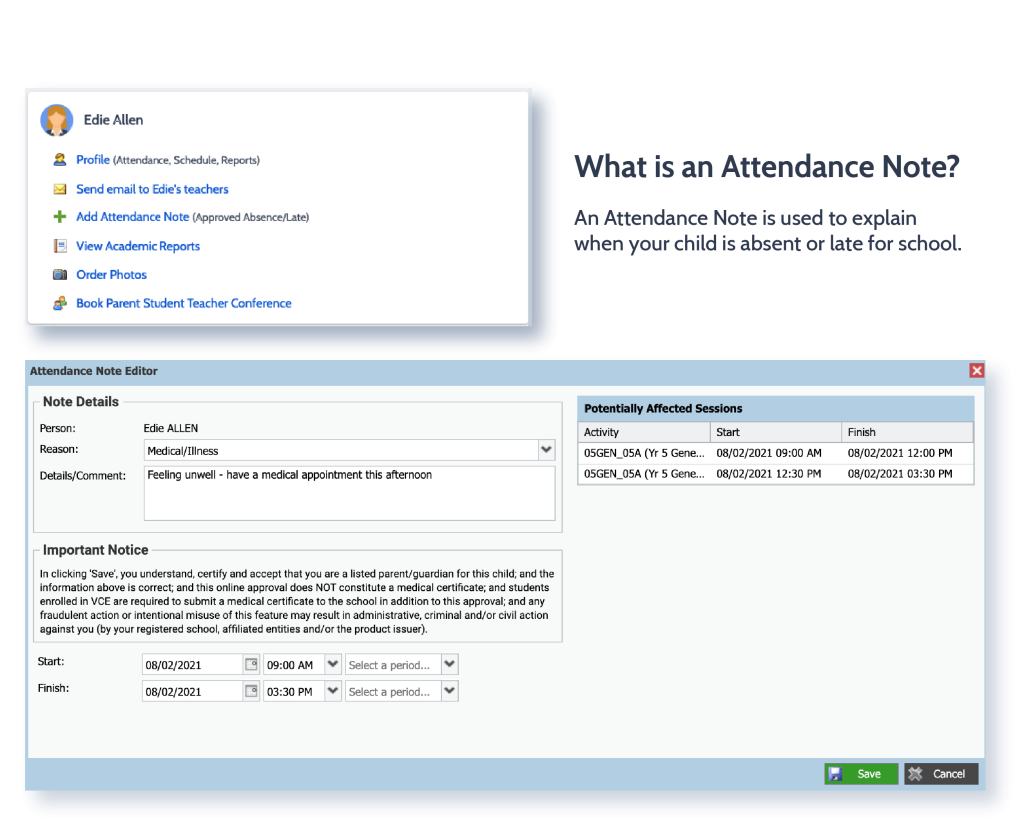
From the Compass home screen (or from your student’s profile), click the Add Attendance Note item.
- From the Compass home screen (or from your student’s profile), click the Add Attendance Note item.
- From the pop-up window
- Select the reason
- Enter a brief description of the absence
- Select the start and finish time
- Click the ‘Save’ button
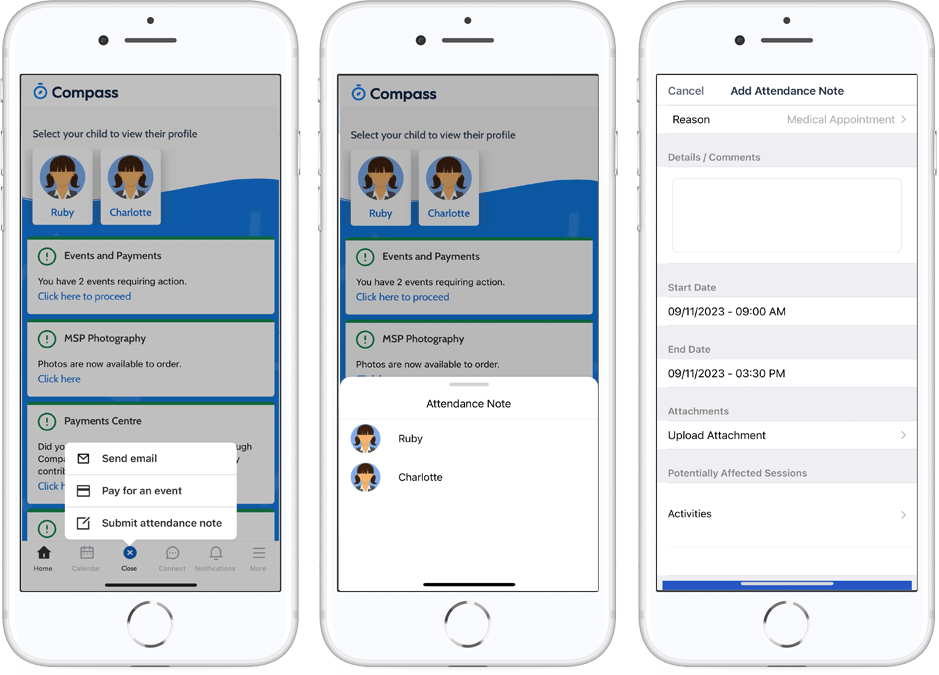
Using the Compass App
- From the homepage, click on the blue shortcuts button from the bottom taskbar
- Click on ‘Submit Attendance Note’
- Select the reason
- Enter a brief description of the absence
- Select the start and finish time
- Click the ‘Save’ button
Where possible, attendance notes should be entered prior to the absence/lateness occurring.
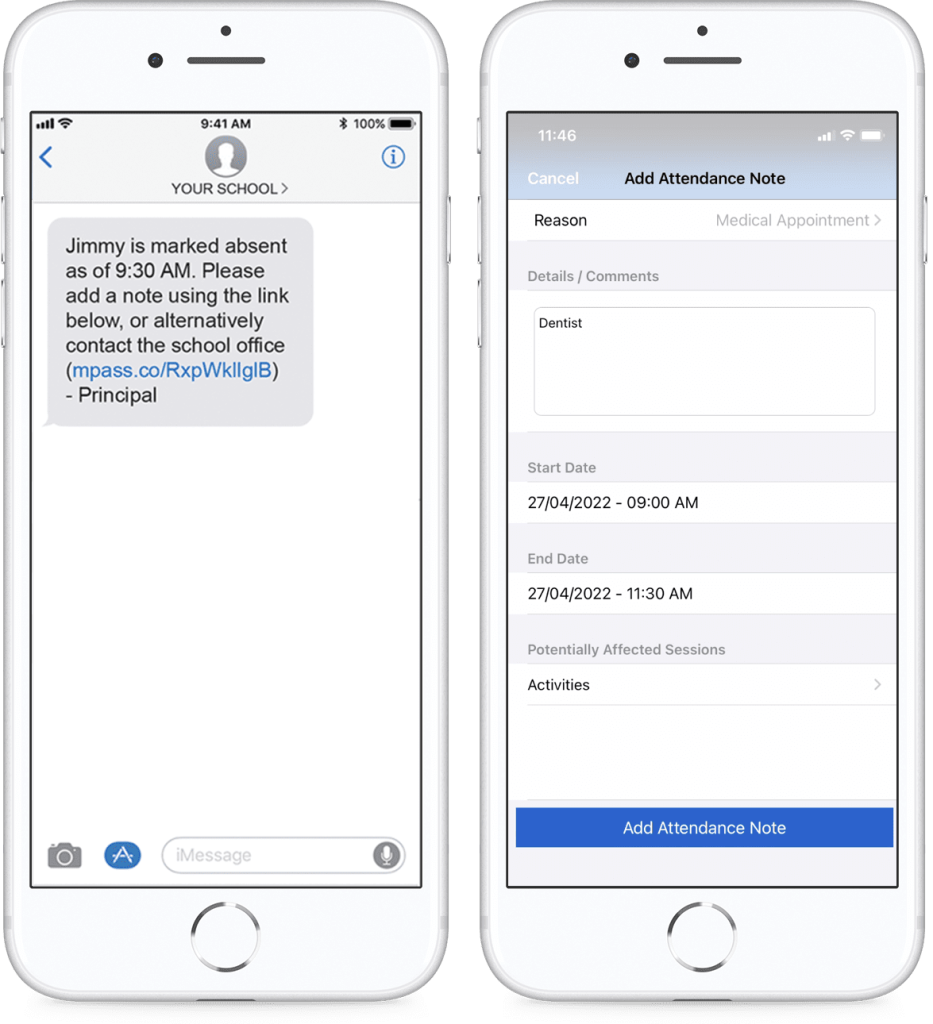
SMS Link
If your child is marked as absent without prior approval you will receive a message containing a link. When you follow the link, you will have the opportunity to explain the absence.
The link will expire after you have clicked it, meaning that it cannot be used to explain unapproved absences in the future. Instead, you will receive another message containing a new link, allowing you to repeat the process.
Attendance Summary
Using Compass you can view up-to-the-minute attendance information for your child.
Notes
This sub-tab provides a list of attendance explanations for your child. From this tab you can also add absence notes (both past and future).
Explain Specific Absences
This sub-tab provides a list of all unexplained lates and absences from class. From this tab you can click to approve specific absences.
Daily Snapshot
Get a live snapshot of the students whereabouts for the day inc. absences, custom classes and events, sickbay entries and early departures.
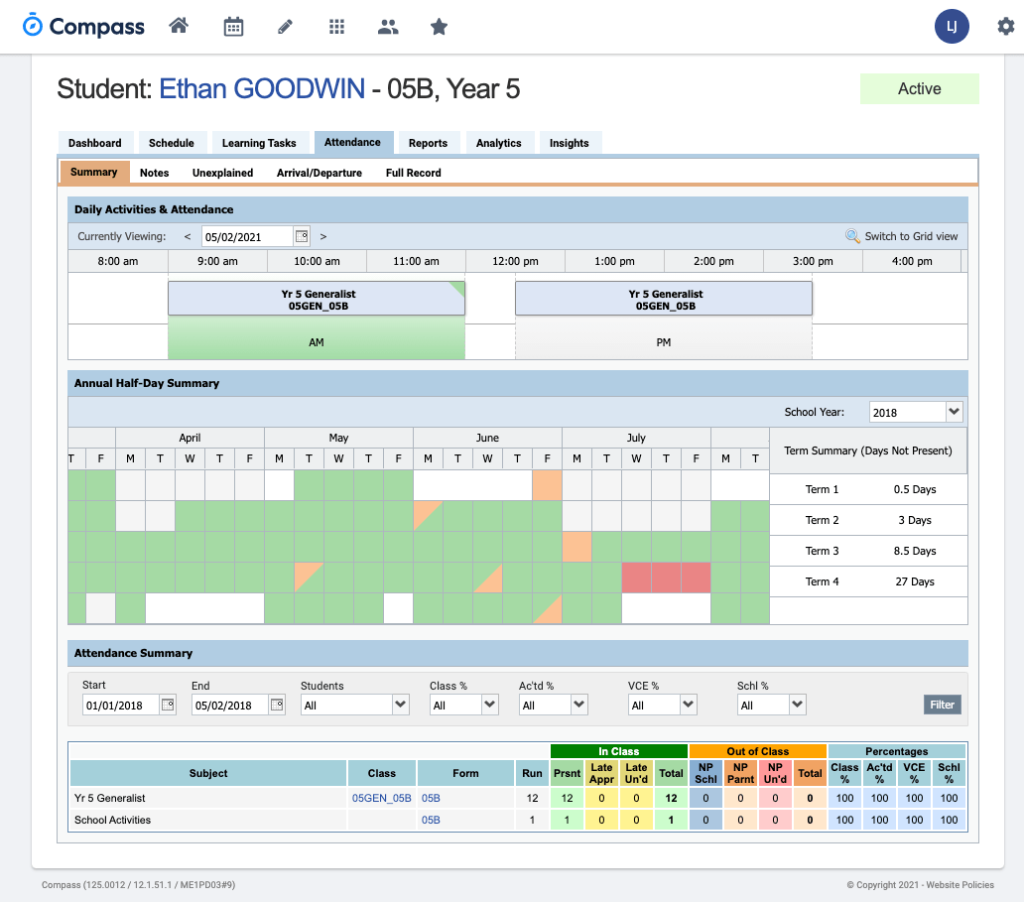
Attendance Summary
Includes a summary of attendance in each class. For full details about a specific absence, click the appropriate number in the grid. For an explanation of a heading item, hover your mouse over the heading of interest.
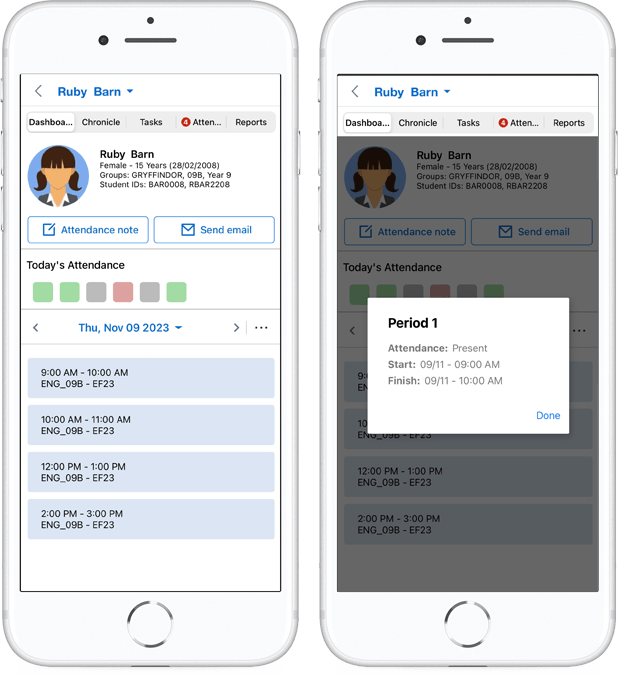
Using the Compass App
- From the homepage, click on your child’s profile picture
- On the Dashboard tab, you can view a summary of your child’s attendance for the day
- Click on the coloured square under ‘Today’s Attendance’ to view your child’s attendance in class
When students are marked ‘Not Present’ in class this can sit in one of three different categories. These include:
NP SchlNot present in class and is explained by a school related activity.
NP ParntNot present in class and is explained by a parent approval.
NP Unap Not present in class with no explanation entered.